利用のリズムをつかむSee your daily rhythm 掌握使用节奏
トークン数、モデル別の内訳、利用の推移。日々のアクティビティがひとつの画面に。Token totals, model breakdowns, and usage trends. Your coding activity in one place. Token 总量、模型分布、用量趋势。每天的开发活动,在一个界面里清晰呈现。
THE PULSE OF YOUR WORK
Claude Code と Codex の利用状況を、ひとつのアプリに。
トークンも、アカウントも。作業のリズムを止めずに確認。Claude Code and Codex usage, together in one small app.
Track your tokens.
Switch accounts. Stay in flow.
Claude Code 和 Codex 的用量,一个应用尽收眼底。
查看
Token,切换账号,保持你的开发节奏。
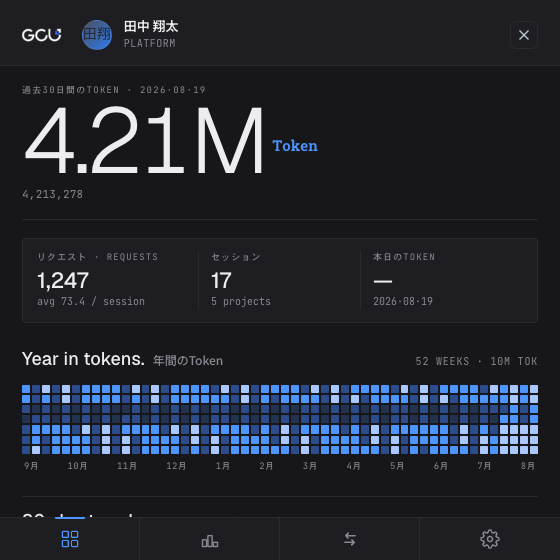
直近 30 日のトークン、年間のアクティビティ。いつものメニューバーから、あなたの AI 利用をひと目で。Your last 30 days in tokens. Your year in activity. See your AI usage right from the menu bar. 近 30 天的 Token 用量,一整年的活跃记录。打开菜单栏,随时了解你的 AI 使用情况。
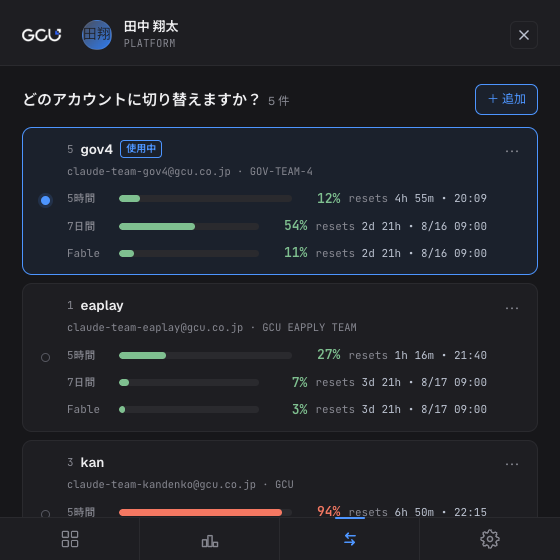
Claude アカウントの使用率とリセット時刻を一覧で確認。次に使うアカウントを、その場で切り替えられます。See usage limits and reset times for your Claude accounts. Switch to the account you need in the same view. 集中查看 Claude 账号的使用率与重置时间。选好下一个账号,直接切换,继续手头的工作。
作業の合間に、必要な情報だけ。
個人の利用状況から、チームの動きまで。A quick check between tasks.
From your daily usage to your team's
activity.
工作间隙,一眼掌握。
从个人用量,到团队动态。
トークン数、モデル別の内訳、利用の推移。日々のアクティビティがひとつの画面に。Token totals, model breakdowns, and usage trends. Your coding activity in one place. Token 总量、模型分布、用量趋势。每天的开发活动,在一个界面里清晰呈现。
Claude アカウントの利用枠を確認して切り替え。作業に戻るまで、ひとつの場所で。Check Claude usage limits and switch accounts without leaving the app. 查看 Claude 账号的用量额度,直接切换账号,然后回到你的工作。
日・週・月の社内ランキングで、AI ツールの利用状況を共有できます。Explore company usage rankings by day, week, or month. See how the team uses AI tools. 按日、周、月查看公司内部用量排行,了解团队如何使用 AI 工具。
ソースコードや会話内容は、サーバーに送信しません。Your source code and conversations are never sent to the server. 你的源代码与对话内容,不会发送到服务器。
あなたのデスクトップに、小さな相棒を。
GCU の Office 365
アカウントで、すぐに始められます。A small addition to your desktop.
Get started with your GCU Office 365
account.
给桌面添一位开发小伙伴。
使用 GCU Office 365 账号,即可开始。
macOS:.dmg を開き、Token Beats を Applications
フォルダーにドラッグしてください。
Windows:.msi を開き、インストーラーの案内に従ってください。初回に
SmartScreen
の警告が出る場合は、「詳細情報」→「実行」を選択してください。管理端末で実行できない場合は
IT 部門へお問い合わせください。
Windows のインストール先は
C:\Program Files\Token Beats です。WebView2 Runtime
がない場合は、インストーラーがダウンロードします。
起動後、GCU の Office 365 アカウントでサインインします。
macOS: Open the .dmg file and drag Token Beats into
Applications.
Windows: Open the .msi file and follow the
installer. If SmartScreen shows a warning, select “More info” → “Run anyway”. If
your managed device blocks installation, contact IT.
Windows installs to C:\Program Files\Token Beats by default. The
installer downloads WebView2 Runtime if it is missing.
Open the app and sign in with your GCU Office 365 account.
macOS:打开 .dmg 文件,将 Token Beats 拖入
Applications 文件夹。
Windows:打开
.msi 文件,按安装程序的提示操作。如出现 SmartScreen
提示,请选择“更多信息”→“仍要运行”。如果公司管理的设备禁止安装,请联系 IT。
Windows 默认安装到 C:\Program Files\Token Beats。如果缺少 WebView2
Runtime,安装程序会自动下载。
启动应用,使用 GCU Office 365 账号登录。
ソースコード、会話、プロンプトは送信しません。トークン数やモデル名などの利用集計に加え、自分のプロジェクトのディレクトリーパスを同期します。詳しい項目は FAQ をご確認ください。
The app does not send source code, conversations, or prompts. It syncs usage totals, model names, and your own project directory paths. See the FAQ for the full list.
不会上传源代码、对话或提示词。应用会同步用量汇总、模型名称,以及你自己的项目目录路径。完整说明请查看 常见问题。
Claude Code と Codex のトークン利用を記録できます。アカウント切り替えは Claude に対応しています。OpenCode 対応は今後の予定です。
Token Beats tracks usage from Claude Code and Codex. Account switching is available for Claude. OpenCode support is planned.
目前支持统计 Claude Code 和 Codex 的 Token 用量,账号切换支持 Claude。OpenCode 支持已列入后续计划。